

Management Plus More
CMS Commander makes managing multiple WordPress sites much easier and faster – but does not stop there! We also provide you with powerful tools to create content, optimize articles and improve your earnings. Read on to learn more and get started immediately!
Manage WordPress
Install the latest version of WordPress and update all your plugins and themes on any number of blogs with a single click.
The powerful content editor built into CMS Commander allows you to create new posts or pages on any number of blogs simultaneously.
One of the biggest time-savers: Install and activate new plugins or themes on any number of your blogs in one go! More details →
Copy all WordPress options as well as the settings of some of the most popular plugins from one blog to all your other sites.
Bulk create new users on multiple WordPress blogs, delete old accounts or edit the details of your blog users.
Easily publish drafts on all your blogs, approve or delete new comments, clear out comment spam on all your sites and more!
Backup & Clone
Always be prepared for the worst! We can create full backups of all your sites in regular intervals to ensure your data is safe. More details →
Should something go wrong it takes just a few clicks to restore one of your automatic backup files and get your site up and running again.
CMS Commander can automatically save backups to your server, your email and upload them to your FTP, Dropbox or Amazon S3 accounts.
Clone an entire WordPress blog including all files, settings and content to a new domain.
No matter if you want to jump start a new project or build a staging site, cloning can save you a lot of time and hassle. More details →
Easily deploy WordPress: CMS Commander makes it possible to create new WordPress sites on your server with pre-configured settings and with your favorite plugins installed and activated. More details →
Create & Optimize Content
Use any of the sources below for free to find videos, images, article, news and other content to use on your own websites! More details →
Use any of the sources to assemble new articles and publish them on any or all of your blogs with CMS Commander’s unique bulk editor.
Create any number of articles and then schedule them on your blogs so that fresh content gets published in regular intervals.
Edit any number of posts or pages on your blog simultaneously! For example to replace keywords in dozens of published articles, set thumbnail images for posts that have none, insert ads or change affiliate links.
Load .csv datafeeds, articles from text files or whole RSS feeds into CMS Commander, mix or edit their content, and then post the result to your sites. More details →
You can use any of the integrated rewriting software to spin content and create unique article variations to post to multiple of your sites.
Monetize Your Blogs
We have integrated many of the most popular affiliate networks into CMS Commander. From finding promotion opportunities while you write a new posts to creating WooCommerce products or building complete affiliate stores – there are lots of possibilities!
Find products for any niche and inject targeted affiliate ads directly into your posts while working on them in our post editor.
Mass edit your articles and insert targeted affiliate links. Or create new categories to showcase affiliate products your visitors might be interested in.
Monitoring & Statistics
Keep track of the total number of backlinks for all of your sites. Includes detailed stats on dofollow and nofollow links. More details →
Monitor uptime for all your sites directly in your CMS Commander dashboard. Pagespeed reports show you how fast your sites respond.
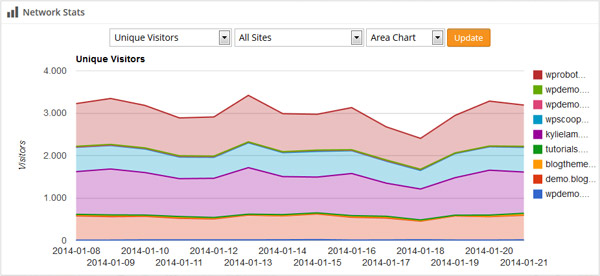 Google Analytics Network Stats
Connect your Google Analytics account to display traffic statistics directly in your dashboard and get alerted of important changes. Our unique network graphic shows you aggregated traffic for your entire network.
Security
All communication between CMS Commander and your sites is sent through an encrypted SSL connection to make it impossible to intercept.
You do not need to enter your admin password to manage your WordPress sites with us. All communication is handled by our secure plugin.
Protect your account with unique changing passcodes, which only you can see in a handy app on your smartphone. Powered by Google Authenticator. More details →
Run malware scans right inside your dashboard to protect your sites and be notified of any threats affecting them.
And More
- Maintenance Mode: Put any website into and out of maintenance mode with a single click.
- 1-Click Login: Enter the WordPress admin area of one or multiple sites with a single click.
- Custom Branding: White label the CMS Commander plugin description on your sites to hide it from clients.
- Database Optimization: Optimize the database of all your sites with one click to free up space.
- Regular Updates: This list keeps getting longer since we add new features regularly.
Great Support
My name is Thomas Höfter and I have been building WordPress sites and plugins since 2008. One of my most popular products is the autoblogging plugin WP Robot. In 2011 I founded CMS Commander because I needed a better solution to manage all my blogs in as little time as possible. Good support is very important and so I still help with providing it personally to our customers. If you have any questions feel free to get in touch with me by sending an email!– Thomas Höfter, CMS Commander-in-chief
Join Over 3,000 Other Commanders!
Sign up now to start managing all your blogs immediately.
Completely free for 30 days. No payment details required!